Know they understand it,
not just that they submitted it.
VivaGo is Tomax’s Smart Defense solution. Students answer a few short video questions about their own work, and you get a rubric-scored report for every answer. Set it up in about 3 minutes.
Sold standalone · Runs inside Assessment Studio and TomaEtest · Grades return to your LMS
The Problem
A submission no longer proves understanding
Polished work, unknown thinking
A clean submission no longer shows who did the thinking behind it.
A score is not evidence
A probability score can't show what a student actually understands. An explanation can.
Oral exams are hard to run
Examining every student in person takes time that most courses don't have, and the schedule rarely fits everyone.
Como funciona
Set up, defend, review
Set up in about 3 minutes
Upload the assignment, choose how questions are created, and review the questions and rubrics.
Students defend their work
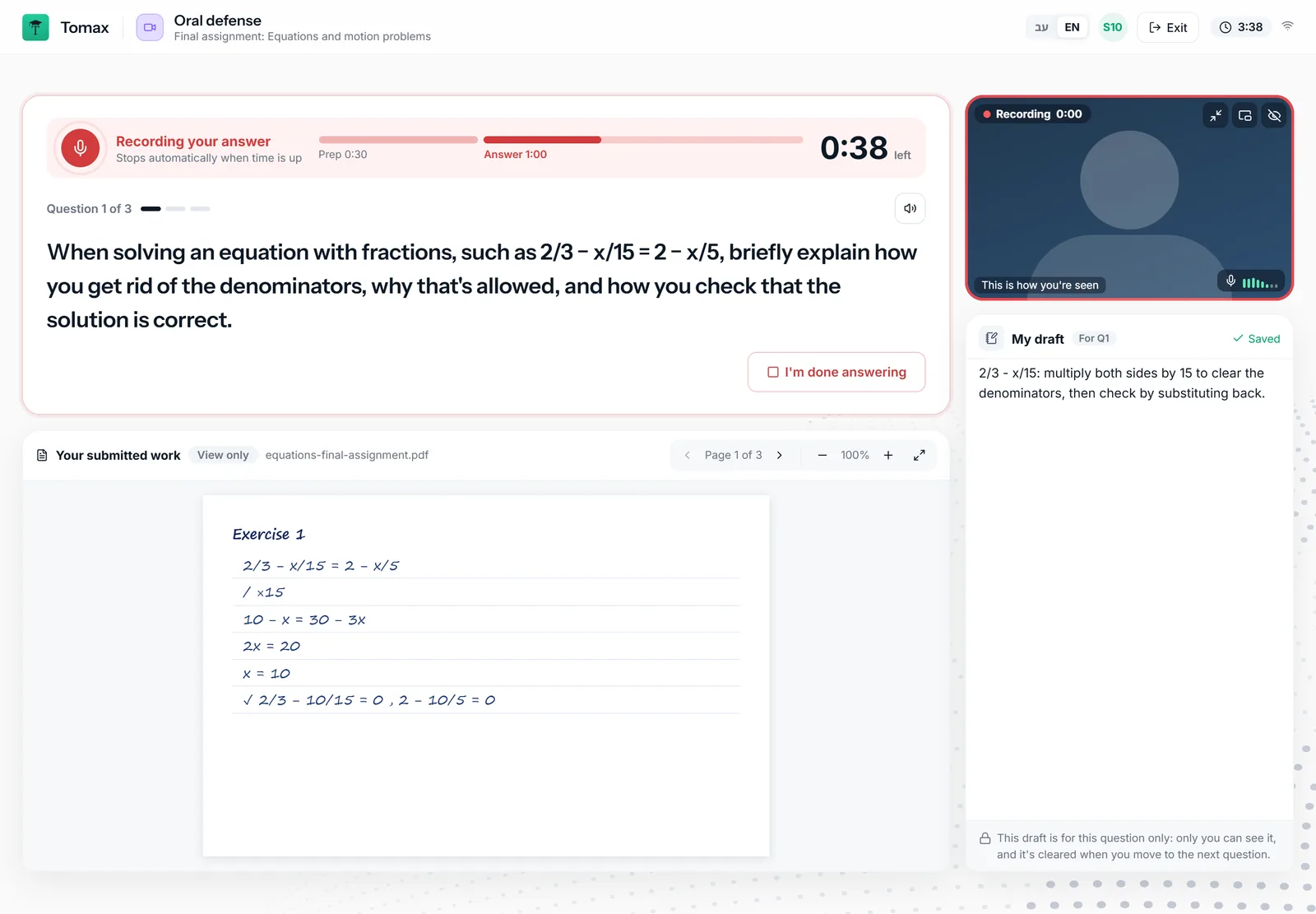
They submit the assignment, then answer 2 to 5 short questions on video. Each question starts with a short prep time.
Review the report
Every answer comes with a recording, a transcript, and rubric scores with written reasons.
Where It Runs
One defense, three places to use it
VivaGo is a Tomax module you can use inside other Tomax products, and it can also be purchased on its own.
Inside Assessment Studio
Add a defense to a formative activity or coursework, in the same place you build your quizzes.
About Assessment StudioInside a TomaEtest exam
Make the defense one part of a secure online exam, alongside your other exam settings.
About TomaEtestStandalone from your LMS
Launch VivaGo from an LMS activity using LTI 1.3. Grades return to the LMS gradebook.
See LMS integrationsWhat You Control
Shaped to the stakes of the assessment
Same, different, or mixed questions
Give every student the same questions, different questions for each student, or a mix, depending on your goals.
AI, you, or both
Generate the questions from the assignment, write them yourself, or combine the two.
Verification that fits the stakes
Depending on setup: identity verification, room verification and a second camera.
Open or closed to their own work
Let students view their submitted work during the defense (view only), or require them to answer from memory.
Rubrics you can trust
Weighted criteria for every question, generated for you and fully editable.
You make the call
Every score can be reviewed and edited by the instructor.
For Students
A short, guided sitting
One sitting, in a few clear steps, from reading the assignment to a confirmation that everything was sent.
Before they start
Students read the assignment, confirm a plain-language declaration, and check their internet, camera and microphone.
During the defense
Short questions with a prep time and a clear timer. A private draft pad is there for notes, and a short connection drop doesn't lose the answer.
Afterwards
Students see a summary of what was submitted and recorded. The instructor reviews everything.
The same defense, in words younger students understand
The K-12 version says “task” and “explain” instead of “assignment” and “defense”, uses a notebook instead of a draft pad, and has a friendly guide that walks students through each step.
The Report
Evidence you can watch, not a score you have to trust
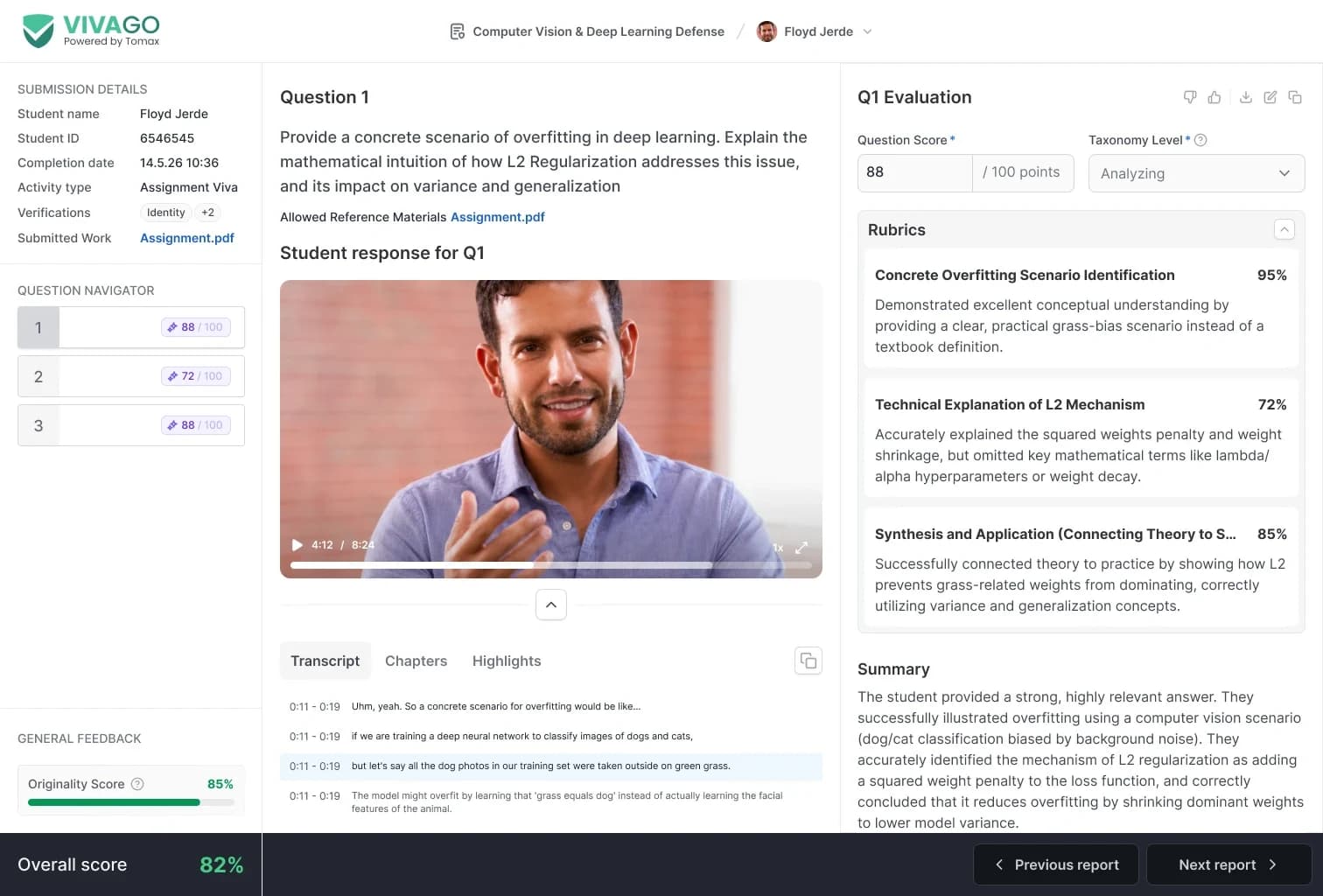
- A recording of every answer, with a transcript, chapters and highlights.
- Rubric scores for each criterion, with a written reason for every score.
- A Bloom's taxonomy level and a score for each question.
- An AI summary of each answer.
- Originality and overall scores for the whole defense.
- Identity and other verification results, depending on setup.
- Previous and next report buttons to move through a class quickly.
Privacy and Control
Built on Tomax security and privacy
Encrypted recordings
Recordings are stored encrypted and covered by Tomax's security and privacy policy.
Your retention rules
Recordings can be deleted automatically, based on your institution's configuration.
Clear to students
Students confirm a declaration first, and are told the camera and microphone record throughout the defense.
Where It Fits
For every kind of institution
Higher education
A short defense on coursework and take-home assignments, where a submission alone doesn't show understanding.
Saiba maisEnsino Básico e Secundário
A version with simpler wording and a friendly guide, so younger students know what to do.
Saiba maisCertification bodies
Extra confidence in high-value credentials, with identity and room verification where needed.
Saiba maisPerguntas frequentes
VivaGo is Tomax’s Smart Defense solution. Students answer a few short video questions about work they submitted, and instructors review a recording and a rubric-scored report for each answer.
A viva voce is an oral examination. VivaGo brings that conversation to any assignment, on video, so each student can take part before the due date, on their own schedule.
Setup takes about 3 minutes. For students, a defense is a few minutes in one sitting, depending on how many questions you choose and the time you set for each.
You choose. Give everyone the same questions, different questions for each student, or a mix, depending on your goals.
No. Proctoring secures the conditions of an exam; VivaGo checks that a student understands their own work. They work well together, and depending on setup you can add identity verification, room verification and a second camera.
Yes. VivaGo can be purchased on its own and launched from LMS activities using LTI 1.3, with grades returning to the LMS gradebook. It also runs inside Assessment Studio and TomaEtest.
You do. VivaGo prepares a rubric-scored report with a transcript and a written reason for each score, and the instructor can review and edit every score.
Recording continues on the student's device and uploads when the connection returns, so a short drop doesn't lose the answer.
Recordings are stored encrypted and are covered by Tomax's security and privacy policy. Your institution can configure automatic deletion.
Yes. VivaGo has a K-12 version with simpler wording and a friendly guide.
See VivaGo on your own assignments
Walk through setup, the student sitting and the report, in a 30-minute session built around your institution's setup.
Solicitar uma demonstração